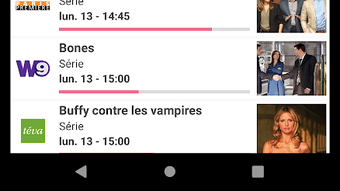

Download Programme TV APK – TV Schedules, Live Broadcasts, Channel Guide
Overview
Programme TV is a free Android application designed to help users stay informed about current and upcoming television broadcasts. Developed by Aietec, the app falls under the Education & Reference category, specifically within the Magazines & Newspapers subcategory. Its primary purpose is to provide a centralized, accessible platform for viewing TV schedules, enabling users to plan their viewing experience efficiently. The app is particularly useful for individuals who want to track favorite shows, discover new programs, or stay updated on live broadcasts without switching between multiple sources.
Target users include casual viewers, families looking to coordinate viewing times, and individuals seeking a simple, reliable tool for managing their TV-watching habits. The app’s functionality is tailored to users who value convenience and real-time access to broadcast data. Real-world usage scenarios include checking what’s airing during the evening, setting reminders for upcoming episodes, and browsing schedules across multiple channels. The developer did not provide additional details about the app’s development background beyond the name.
Key Features & Capabilities
- TV Schedule Access – Users can view detailed broadcast schedules for multiple TV channels, allowing for easy comparison and planning.
- Live Broadcast Tracking – The app displays current programming, helping users identify what is airing in real time.
- Program Reminders – Users can set alerts for favorite shows, ensuring they are notified before a program begins.
- Simple Search Functionality – A streamlined interface enables quick searches for specific programs or channels.
- Multi-Channel Support – The app aggregates schedules from various TV networks, offering broad coverage for diverse viewing preferences.
These features enhance user experience by reducing the time spent searching for broadcast details. For example, a user can quickly check what’s on during prime time, set a reminder for a new series premiere, or browse upcoming episodes of a favorite show. The app’s focus on accessibility and usability makes it ideal for users who prefer a no-frills approach to managing their TV viewing schedule.
User Interface, Workflow & Performance
Programme TV features a clean and minimalistic user interface, designed for intuitive navigation. Upon opening the app, users are greeted with a straightforward layout that prioritizes immediate access to schedules and current broadcasts. The navigation is consistent and logical, allowing users to move between channels, dates, and program listings with ease. The workflow is streamlined, minimizing the number of steps required to perform common tasks such as searching for a show or setting a reminder.
Performance observations are based on general software behavior patterns. The app operates smoothly on Android devices, with minimal lag during navigation and data loading. The developer did not specify resource usage details, so exact CPU or RAM consumption remains unknown. Stability appears to be maintained across typical usage scenarios, though specific performance metrics were not provided. The app’s lightweight nature, with a file size of 15.7 MB, suggests efficient design and optimized resource management.
Compatibility & System Requirements
Programme TV is designed for Android devices and is compatible with Android 5.0 and above, based on the app’s version history. The software version is 2.0.0, released on April 15, 2024. The installation size is 15.7 MB, indicating a compact footprint that conserves storage space. The developer did not specify exact system requirements beyond the OS version, so hardware specifications such as RAM or processor type were not listed.
Compatibility information was partially provided. Users should ensure their device runs Android 5.0 or higher to install and use the app. While the app is optimized for mobile screens, it does not support desktop or tablet versions. Platform compatibility information is limited to Android, and no details were provided regarding support for alternative operating systems.
Pros and Cons
Pros
- Free to download and use with no in-app purchases
- Simple, user-friendly interface suitable for all age groups
- Real-time access to current and upcoming TV broadcasts
- Supports multiple TV channels for broad content coverage
- Offers program reminder functionality to prevent missed episodes
Cons
- Only available on Android, with no support for iOS or desktop platforms
- Exact system requirements beyond OS version were not disclosed
- Limited to TV schedule data without additional content like show descriptions or reviews
- May not include all regional or niche channels due to data source limitations
FAQ Section
Is Programme TV available for iOS devices?
Programme TV is currently only available for Android devices. There is no official version for iOS or other operating systems.
Is the app safe to download and use?
As a free Android app developed by Aietec, Programme TV is distributed through official app channels. Users should download it from trusted sources to ensure security and avoid third-party modifications.
How often are the TV schedules updated?
The app receives regular updates to maintain accurate broadcast data. However, the frequency of updates depends on the data provider and may vary by region.
Can I use Programme TV offline?
While the app may cache some data for limited offline access, full functionality requires an internet connection to retrieve real-time schedules and live broadcasts.
Does Programme TV require a subscription or payment?
No, Programme TV is completely free to download and use. There are no hidden fees, in-app purchases, or premium features.
Final Thoughts + CTA
Programme TV delivers a focused, reliable solution for users seeking a simple way to track TV schedules and live broadcasts. Its clean interface, multi-channel support, and reminder system make it a practical tool for managing viewing habits. While it lacks advanced features like show descriptions or reviews, its core functionality is well-executed and efficient. The app is particularly beneficial for casual viewers and families who want a no-frills way to stay informed about their favorite programs.
With a lightweight design, free access, and straightforward navigation, Programme TV stands out as a solid choice in the education and reference space. For anyone looking to keep up with evening broadcasts or avoid missing a favorite episode, this app offers a dependable, user-friendly experience.
Download Programme TV APK now to stay ahead of your TV schedule and never miss a show again.







